
Website Popups are the ultimate lead capturing tool available:
Here’s why…
You’ve poured countless hours and resources into building a sleek, well-designed website.
You’ve set up pages, added engaging content, maybe even invested in SEO, all in the hope of drawing traffic and, ultimately, gaining new customers.
Yet, despite all this effort, most visitors come and go without a trace.
Sound familiar?
Many business owners face this exact frustration.
The problem isn’t always attracting visitors; it’s keeping them engaged long enough to build a connection.
And that’s where website pop-ups come into play.
Think of a pop-up like a friendly salesperson at a retail store—not intrusive, but available at just the right moment to offer helpful info or an incentive.
When used thoughtfully, website popups can turn casual visitors into loyal subscribers or even paying customers.
In this article, I’ll show you “How to increase website conversions with pop-ups.”
We’ll cover everything from…
• Choosing the right type of lead capture popup to crafting compelling content
• Popup lead capture forms best practices.
Let’s dive in and start to capture leads with pop-ups!
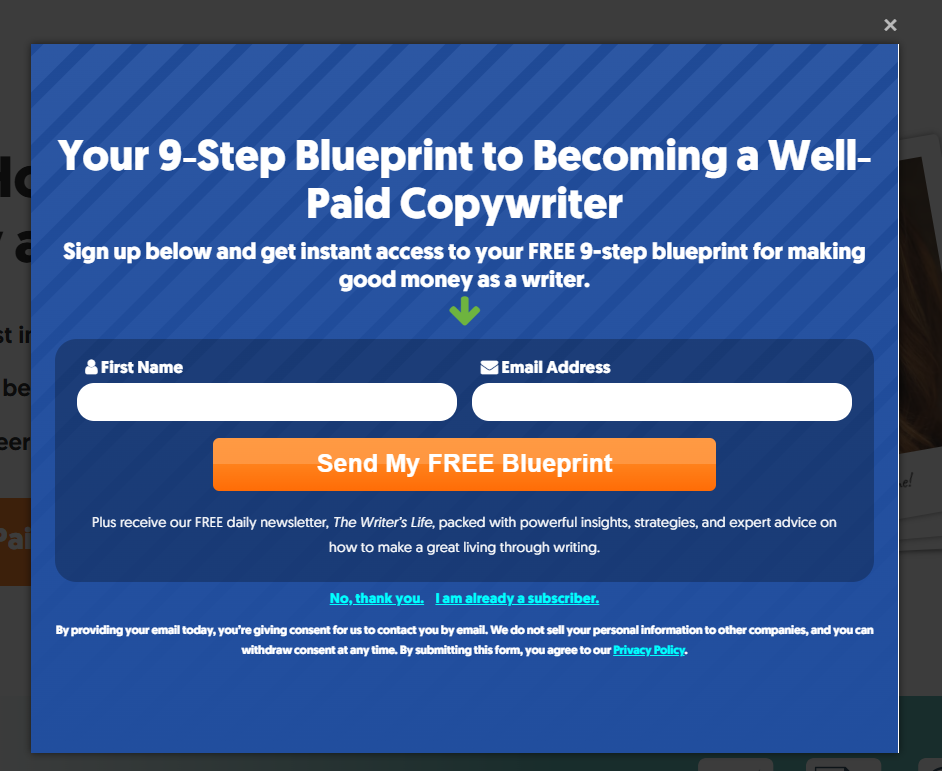
A website pop-up featuring a bold headline, engaging image, concise message, lead capture form, clear call-to-action (CTA) button, mobile-friendly design, exit-intent trigger, and easy close icon.
Why Use Pop-ups for Lead Generation?
Imagine walking into a coffee shop, looking around, and noticing that no one greets you or points you to the menu.
You might feel lost, even tempted to walk back out.
Websites without lead capture tools can sometimes give visitors that same feeling of aimlessness. Pop-ups, when used correctly, act as that friendly barista, helping guide visitors toward something valuable:
• a newsletter,
• a special offer,
• or useful content that addresses their needs.
The Psychology Behind Pop-ups
Pop-ups work because they tap into a few universal psychological triggers that encourage action. First, there’s the principle of visibility.
A pop-up grabs attention because it appears in the foreground, a stark contrast from the background content.
But it’s more than just visibility—pop-ups leverage principles of timing and relevance.
A well-timed pop-up, like one that appears as someone starts to leave the page, can feel like a natural opportunity rather than an interruption.
For example, an exit-intent pop-up might display a “Wait, don’t leave empty-handed!” message right as a visitor moves their cursor to close the window.
It’s a last-chance opportunity to make a connection, offering an incentive that could tip the balance.
Conversion Benefits of Website Popups
Studies have shown that pop-ups can significantly increase conversion rates when used strategically. In fact, some businesses report up to a 300% increase in email sign-ups after implementing exit-intent or scroll-based pop-ups.
The key is to balance visibility with value.
People don’t mind a well-placed pop-up…
As long as it’s offering something genuinely helpful—like a discount, a free guide, or exclusive insights.
Real-Life Example
One great example comes from an online retail company that was struggling with abandoned carts.
They introduced an exit-intent pop-up offering a small discount for first-time buyers, and within months, they saw a 20% increase in sales conversions.
By understanding why website popups work and how to align them with the visitor’s journey, you can begin to see how these small but impactful tools fit into a larger lead generation strategy.
In the next section, we’ll dive into the different types of popups and how to choose the right one for your specific audience.
Types of Lead Capture Popups and Choosing the Right One
Picture this: You’re scrolling through a website, enjoying the content, when suddenly, a popup appears.
But instead of interrupting, it feels like it’s reading your mind—offering exactly what you were hoping to find. The type and timing of that pop-up are what make the experience feel smooth, almost natural, rather than disruptive.
This is the art of choosing the right kind of pop-up.
Different Website popups work best for different purposes, and matching the type to the visitor’s behaviour can make a significant difference.
Let’s explore the most effective types and when each one shines.
Type #1: Entry Pop-ups: Making a Strong First Impression
Entry pop-ups appear right as a visitor arrives on your site.
They’re like a welcome mat… guiding your visitor’s first interaction with your brand.
These pop-ups are perfect for promoting a welcome offer, like a discount code, or for encouraging newsletter sign-ups right from the start.
However, they can be a bit more intrusive, so they work best when offering something immediately valuable.
Example in Action: Imagine a website for a fitness brand. An entry pop-up offers new visitors a 10% discount on their first purchase, making a compelling first impression and encouraging them to engage with the brand further.
When to Use: Entry pop-ups are ideal when you want to capture visitors’ attention immediately, especially if you’re offering something highly valuable, like a limited-time offer for new customers.
But keep it concise—people often feel overwhelmed if hit with too much information right away
Type #2: Exit-Intent Pop-ups: The Last Chance Offer
Exit-intent pop-ups are like the “wait—there’s more!” moment.
They appear just as a visitor is about to leave your site, capturing attention at the last possible moment.
These pop-ups are incredibly effective for reducing bounce rates or salvaging an abandoned cart.
The beauty of exit-intent pop-ups is their timing; they allow you to connect with visitors who may be on the fence about leaving.
Example in Action: A home décor e-commerce site noticed visitors were abandoning their carts frequently.
By adding an exit-intent pop-up offering free shipping on their first order, they saw a jump in completed purchases.
When to Use: These pop-ups are best suited for high-value actions, like recovering abandoned carts or encouraging sign-ups just as visitors are about to leave.
Type #3: Scroll-based Pop-ups: Engaging the Interested
Scroll-based pop-ups are a bit subtler.
They appear only after a visitor scrolls to a certain point on the page, which indicates they’re already engaged with your content.
These pop-ups work well for in-depth content pages or blog posts, where visitors are genuinely interested in learning more.
This type feels less intrusive because it’s triggered by the visitor’s own interaction with the page.
Example in Action: A B2B software company uses a scroll-based pop-up that appears midway through a blog post.
It invites readers to download a free eBook that expands on the article’s topic, offering additional value in exchange for an email.
When to Use: Scroll-based pop-ups are perfect for blogs, case studies, or long-form pages where readers are likely to be interested in further content.
Type #4: Timed Pop-ups: Building Anticipation
Timed pop-ups appear after a visitor has been on a page for a specific amount of time, usually set between 10 to 30 seconds.
This approach assumes that if someone has stayed on the page for a certain duration, they may be ready to engage further.
Timed pop-ups are particularly effective for visitors who are still exploring but may need a nudge toward a lead capture form.
Example in Action: A personal finance blog uses a timed pop-up that appears after 20 seconds, inviting readers to sign up for a weekly newsletter with exclusive financial tips.
This gentle prompt feels relevant without being too aggressive.
When to Use: Timed pop-ups are versatile and can be used on nearly any page where visitors are likely to linger.
They’re great for encouraging newsletter sign-ups, content downloads, or other engagement-focused actions.
Choosing the Right Website Pop-up Type for Your Audience
Choosing the right pop-up isn’t one-size-fits-all.
Think about your audience’s intent and the action you want them to take.
For instance, an entry pop-up might be ideal if you’re offering a time-sensitive promotion for first-time visitors.
Meanwhile, scroll-based or exit-intent pop-ups may work better for capturing leads on more content-heavy pages, like a blog or a product catalog.
A Tip to Remember:
Experiment with different types.
And see what resonates with your audience.
Many website platforms and pop-up tools allow A/B testing, so you can try variations to see which pop-up design, timing, and message get the best response.
With a well-chosen pop-up type in place, you’re not just collecting leads.
You’re building a pathway for visitors to engage more deeply with your business.
In the next section, we’ll dive into what makes pop-up content truly compelling, from writing an irresistible headline to crafting a clear call-to-action that converts.
Types of Pop-ups by Placement:
• Full-screen overlay:
Best for high-value offers or exit-intent pop-ups where you want to make a strong impact.
• Slide-in pop-ups:
Good for mid-content offers that don’t fully interrupt the visitor’s experience. Often appear at the bottom corner of the page.
• Sticky bar:
A banner at the top or bottom of the page. Great for ongoing offers or announcements without taking up much space.
Example in Action: A news website offers a “Subscribe for Breaking News” sticky bar at the top of the screen. It’s there for visitors who want updates but doesn’t interrupt the flow of reading.
Design Tip: Test different pop-up placements to see what works best. Slide-ins and sticky bars can be less disruptive while still providing an effective way to capture leads.
Pop-up Content That Converts
Choosing the right pop-up type is just the beginning.
The real magic lies in what the pop-up says and offers.
Think of pop-up content as your “elevator pitch”—you have just a few seconds to make a compelling case, so every word counts.
This section covers the key Pop-up lead capture strategies that stops visitors in their tracks and nudges them toward action.
1. Crafting an Engaging Headline: The First Impression
The headline is the hook. Its the make-or-break moment when a visitor decides whether to engage or dismiss your pop-up.
A good headline grabs attention immediately by:
• Appealing to curiosity,
• Urgency,
• or a direct benefit.
Think of It Like This:
Imagine you’re at a farmer’s market, and vendors are calling out to passersby. One vendor says, “Fresh tomatoes for sale!”
But another shouts, “Get your hands on the juiciest tomatoes you’ll taste all summer!”
Which one do you stop for?
That’s the power of a headline that grabs attention and sparks interest.
Effective Headlines in Action:
- Curiosity-Based: “Want to Know Our Secret to Double Your Productivity?”
- Benefit-Oriented: “Boost Your Sales with This Free Marketing Guide!”
- Urgency-Driven: “Last Chance! Get 15% Off Your First Order Today.”
A strong headline keeps the focus on the visitor’s needs.
It highlights how your offer can fulfill them. You’re essentially inviting them to explore what they’re already interested in but might not have fully realized yet.
2. Offering Value: The Lead Magnet That Compels Action.
An effective pop-up goes beyond a catchy headline.
It must offer something of real value in exchange for the visitor’s contact information.
This value is typically delivered in the form of a “lead magnet”—a free resource, discount, or exclusive access that incentivizes them to opt in.
Think about it from the visitor’s perspective: “What do I get out of this?”
A lead magnet should feel like a gift, not a bribe.
For example, if you run a business consulting site, an enticing lead magnet could be a free “Business Growth Checklist” or “Top 10 Tips for Scaling Your Business.”
Popular Lead Magnet Ideas:
- E-books and Guides: Offer actionable insights in a downloadable format.
- Discount Codes: Perfect for e-commerce; encourages immediate purchase.
- Exclusive Content or Early Access: Ideal for subscription-based or content-driven websites.
- Webinars or Free Trials: Great for service-oriented businesses wanting to engage users deeper.
Example in Action: A marketing agency offers a “5-Day Free Marketing Bootcamp” via email. Visitors who opt in receive a daily email with a marketing tip and action step, creating anticipation and delivering real value, which builds trust and keeps them engaged.
3. Clear Call-to-Action: Making the Next Step Obvious
Once the headline grabs attention and the lead magnet pique interest, the call-to-action (CTA) seals the deal.
A CTA should be short, actionable, and direct, guiding the visitor on what to do next.
Avoid generic CTAs like “Submit” or “Click Here.”
Instead, use language that clearly states the benefit of taking action.
CTA Examples:
• Action-Oriented: “Get My Free Guide Now”
• Value-Focused: “Unlock 15% Off”
• Engagement-Based: “Yes, I Want to Grow My Business!”
A Simple Tip: Make your CTA button stand out visually with a bold colour that contrasts with the rest of the pop-up. Keep the text no longer than a few words, so it’s easy to read at a glance.
Example in Action: A financial advice website offers a free budgeting tool with the CTA, “Start Saving Today!” This CTA is specific, positive, and action-driven, making it clear what the visitor will gain by clicking.
4. Additional Content Tips: Personalizing Your Pop-up
Personalization can make a significant impact on a pop-up’s effectiveness. People tend to engage more with content that feels tailored to them.
Try adding personalization elements, like addressing the visitor by their location (“Hello, Austin Residents!”) or referring to the page content (“Want more insights on [topic they’re reading about]?”).
Example in Action: An online bookstore uses a pop-up on book review pages that reads, “Love mystery novels?
Get our top 10 picks delivered to your inbox.” By speaking directly to the visitor’s interest, it feels like a natural fit and boosts the likelihood of engagement.
By carefully crafting your pop-up content—starting with a compelling headline, delivering a valuable offer, and ending with a clear CTA—you’re setting up each pop-up to maximize conversions.
In the next section, we’ll discuss how to design pop-ups that don’t just look good but function seamlessly, creating a user experience that supports rather than interrupts the visitor journey.
Designing Pop-ups That Blend with the User Experience
A pop-up’s design can make or break its effectiveness.
Think of it like packaging on a product—an appealing design invites curiosity, while a cluttered, poorly designed pop-up can push people away.
The goal is to create a pop-up that catches attention but also feels natural and enhances the user experience.
• Keep It Simple and Uncluttered
An effective pop-up design should be clean and simple.
Avoid overwhelming visitors with too much text, multiple images, or overly complex graphics.
Instead, aim for a design that feels light, uncluttered, and easy to read at a glance.
A minimalist design helps your core message and CTA stand out.
Example in Action: Imagine a clothing brand using a pop-up to offer a 10% discount.
A clean, simple design with just the headline, a short offer description, and a bold CTA button keeps the message clear and the experience quick and pleasant for visitors.
Design Tip: Limit your pop-up to one image, a headline, a brief supporting sentence, and a single CTA button. This way, it’s visually appealing without distracting from the message.
• Use Colors That Match Your Brand and Stand Out
Colors play a big role in catching a visitor’s eye and making the pop-up feel consistent with your website’s design.
- Use colors that align with your brand but also contrast enough to ensure the pop-up stands out on the page.
A good rule of thumb is to choose a color scheme that highlights the CTA button without being too jarring.
Example in Action: A wellness website might use calming blues and greens in its pop-up to reflect its brand’s soothing, natural theme, with a bright orange CTA button to draw the eye to the action.
Design Tip: Pick a background color that contrasts slightly with the page content, making the pop-up visible but not disruptive.
Use a bold, complementary color for the CTA button to make it visually appealing and easy to find.
• Strategic Use of Images and Icons
Images can enhance a pop-up, but only if they add value.
When possible, include images or icons that relate directly to the offer.
For instance, if you’re offering a free eBook, a small icon of a book or a visual mock-up can make the offer feel more tangible.
Example in Action: An online course platform uses a pop-up to offer a free video lesson.
The pop-up includes a small icon of a play button or video thumbnail, visually hinting at the content, making it feel more engaging and inviting.
Design Tip: Avoid generic stock images that don’t connect to the offer. Instead, use visuals that are directly relevant to what you’re offering or, if applicable, align with your brand’s style.
• Consider the Size and Placement of Your Pop-up
The placement of a pop-up affects how it’s received. Traditional full-screen pop-ups work, but they can be intrusive if not used sparingly.
Consider other types of pop-ups that might provide a smoother experience, such as slide-ins or sticky bars, which appear at the side or top of the page, allowing visitors to continue browsing while they consider the offer.
• Incorporate Clear Exit Options
One major complaint about pop-ups is feeling “trapped” by them, especially if there’s no clear way to close them.
Always include a visible “X” or “No Thanks” option, allowing visitors to exit easily if they’re not interested.
This makes the interaction feel more respectful and less forced.
Example in Action: A fitness website offers a scroll-based pop-up that invites users to download a workout guide. A subtle “No Thanks” button lets visitors exit without feeling pressured, keeping the interaction friendly.
Design Tip: Place the exit button or option in an obvious spot, typically the top corner or near the CTA. This small gesture shows respect for the user’s control and makes them more likely to return to your site.
• Animation and Timing: Keeping It Subtle and Natural
A little animation—like a fade-in or slide-in effect—can make your pop-up feel less abrupt.
However, avoid excessive movement or blinking effects, which can feel distracting or overly aggressive.
Pop-ups should feel like a natural part of the browsing experience, not a sudden interruption.
Example in Action: A travel website uses a fade-in effect for its exit-intent pop-up, inviting visitors to join their travel newsletter.
The smooth animation feels friendly, not forceful, and draws attention without startling the reader.
Design Tip: Use subtle animations for a more welcoming experience. Test different timings to ensure the pop-up appears at the right moment—like after 10 seconds on a page or after a certain scroll depth.
With a well-designed pop-up, you’re providing an appealing, user-friendly experience that’s more likely to lead to engagement.
In the next section, we’ll look at tracking and measuring the performance of your pop-ups so you can refine your approach and maximize conversions.
Tracking and Measuring Pop-up Performance
Creating pop-ups is just the first step. To know if they’re truly effective, it’s essential to track and measure their performance. By analyzing data, you can identify what’s working, make informed adjustments, and continually improve your pop-up strategy to capture even more leads. Here are the key metrics and methods to help you measure pop-up success.
Conversion Rate: Measuring Pop-up Effectiveness
The conversion rate is the percentage of visitors who completed the desired action (like signing up for a newsletter or downloading an eBook) after seeing your pop-up.
This is the most direct indicator of your pop-up’s success. If your pop-up isn’t converting well, it may need adjustments in design, copy, or timing.
How to Calculate: Divide the number of conversions (e.g., sign-ups) by the total number of pop-up displays, then multiply by 100 to get the percentage.
Example in Action: A home decor store has a pop-up offering 10% off the first purchase. If 1,000 visitors see the pop-up and 50 of them sign up, the conversion rate would be 5%.
Benchmark: Pop-up conversion rates vary, but a rate between 3-10% is generally considered good.
If you’re falling below this, try experimenting with different designs, messages, or pop-up types.
Bounce Rate and Engagement Time: Tracking User Reactions
Another important metric to watch is bounce rate—the percentage of visitors who leave your site after viewing a single page.
If visitors frequently exit your site immediately after encountering a pop-up, it might be too intrusive, poorly timed, or irrelevant.
Similarly, tracking engagement time (how long visitors stay on a page) before and after a pop-up appears can show how it impacts user experience.
Example in Action: An online bookstore notices that its entry pop-up for a newsletter sign-up is causing visitors to leave right after it appears.
By delaying the pop-up by a few seconds and making the offer more enticing, they reduce their bounce rate and increase engagement.
Actionable Insight: If bounce rates are high or engagement time is low, consider modifying pop-up timing, simplifying the design, or revising the copy to better match visitor intent.
A/B Testing: Refining Your Pop-ups with Data
A/B testing (or split testing) is a powerful method for fine-tuning your pop-ups.
It involves creating two or more versions of a pop-up and showing them to different segments of your audience.
By comparing which version performs better, you can make data-driven decisions to improve engagement and conversion rates.
What to Test:
• Headline: Test different headlines to see which grabs attention best.
• CTA Button Text: Try variations like “Get My Guide” vs. “Download Now.”
• Timing and Placement: Test different triggers (e.g., entry vs. exit-intent) to see which performs best.
• Design Elements: Experiment with colors, images, and button placements.
Example in Action:
A SaaS company tests two pop-ups: one with a “Start Free Trial” CTA and another with “Get 30 Days Free.”
By tracking conversions, they find that “Get 30 Days Free” resonates more and increases sign-ups by 20%.
Testing Tip: Change only one element at a time to isolate its effect.
This helps ensure that any difference in performance is due to that specific change.
Exit Rate: Understanding Visitor Drop-off
The exit rate tells you how many visitors leave your site after encountering a pop-up. This can highlight if a specific type of pop-up is disruptive.
A high exit rate on pages with pop-ups might signal a need for adjustments, like changing the pop-up’s timing or making it less intrusive.
Example in Action: A blog site realizes that a mid-content pop-up for a webinar registration is causing high exit rates.
They switch to a scroll-based pop-up that appears later in the article, reducing exits and increasing sign-ups.
Actionable Insight: Use exit rate as a feedback loop. If visitors are consistently leaving after encountering a pop-up, consider either repositioning the pop-up or refining the offer.
Lead Quality: Assessing the Value of Captured Leads
Finally, it’s important to evaluate the quality of the leads your pop-ups are capturing.
A high conversion rate is great, but it’s even better when those leads are engaged and likely to convert into customers.
Analyze the engagement and retention rates of leads captured through pop-ups to determine whether your pop-up strategy is attracting valuable prospects.
Example in Action: A business consulting site notices that leads from their “Free Business Checklist” pop-up are highly engaged, often returning to the site and eventually booking consulting sessions. This indicates that the pop-up is not only effective but also attracts high-quality leads.
Actionable Insight: If you notice low engagement from leads captured through a specific pop-up, consider refining the offer or messaging to attract a more relevant audience.
Conclusion: Turning Visitors into Leads with Strategic Pop-ups
Using pop-ups effectively isn’t about throwing flashy ads in front of your visitors; it’s about delivering timely, relevant messages that help guide them toward something valuable.
By carefully crafting each element—type, design, content, and timing—you can create a user experience that’s not only engaging but also helpful, turning casual visitors into interested leads.
As a business owner, think of each pop-up as a small bridge.
Each bridge, if well-built, can take a visitor one step closer to becoming a customer.
With the right data, thoughtful testing, and a willingness to adapt, pop-ups can be an incredibly powerful tool in your lead generation toolkit.

0 Comments